
December 11, 2025
It’s no secret that artificial intelligence (AI) has made its way into many teachers’ favourite educational technology tools and platforms. More and more products are integrating AI capabilities to enhance learning experiences. From personalised tutoring to adaptive assessments, AI is transforming how we teach and learn.
We believe teachers need to be at the centre of this transformation, and we’ve been exploring ways to use AI to create even more engaging and impactful lessons. Our goal is to provide teachers with safe and powerful AI tools that save time, personalise learning, and improve student outcomes. By providing AI prompts for teachers, we aim to empower educators to easily craft creative and practical formative assessments.
Evaluating student learning with formative assessments
To provide the best possible learning experiences for our students, we need to know our students well and have a clear understanding of their social and academic needs. One tool we can use to achieve this is routine formative assessment. Formative assessments are checkpoints that help educators determine student understanding in real time and adjust instruction accordingly.
By regularly checking in with students, teachers can identify misconceptions early and provide appropriate support. Routine formative assessments do not have to be time-consuming or stressful for students. Simple strategies like exit tickets, quick quizzes, and games can offer valuable insights into student learning without interrupting the flow of a lesson. When we make formative assessments a part of our classroom routine, teachers can see their students’ minds at work and adapt their teaching to meet students’ needs.
Well-designed formative assessments are crucial for measuring student progress, identifying areas for improvement, and informing instructional decisions. Quizzes are a common and effective type of formative assessment often utilised by teachers. However, creating effective multiple-choice quizzes requires a deep understanding of learning objectives, careful question construction, and consideration of potential misconceptions. Teachers must craft questions that accurately assess student knowledge, avoid ambiguity, and offer a range of answer choices that are both plausible and distinct.
At Nearpod, we understand that this process is extremely time-consuming and that educators need and deserve support. But we now have a solution.
Introducing: AI Create from Nearpod!
We’re excited to share Nearpod’s new AI question generator, AI Create, designed to support busy teachers. Humans, developed specifically for teachers, built AI Create, and never trained on student data, with unbeatable safety features that educators can count on. Our developers have been held to the highest standards to protect student privacy and ensure that the AI generates questions that are appropriate, respectful, and bias-free.
AI Create is a question generator specifically designed to create education-based content that emulates the questions teachers see in materials such as exams, textbooks, and our premade Nearpod lessons. We’ve carefully crafted a tool that ensures the accuracy and relevance of the generated content and questions, so educators can trust that they align with curriculum, standards, and learning objectives. AI Create is only available to school and district accounts.
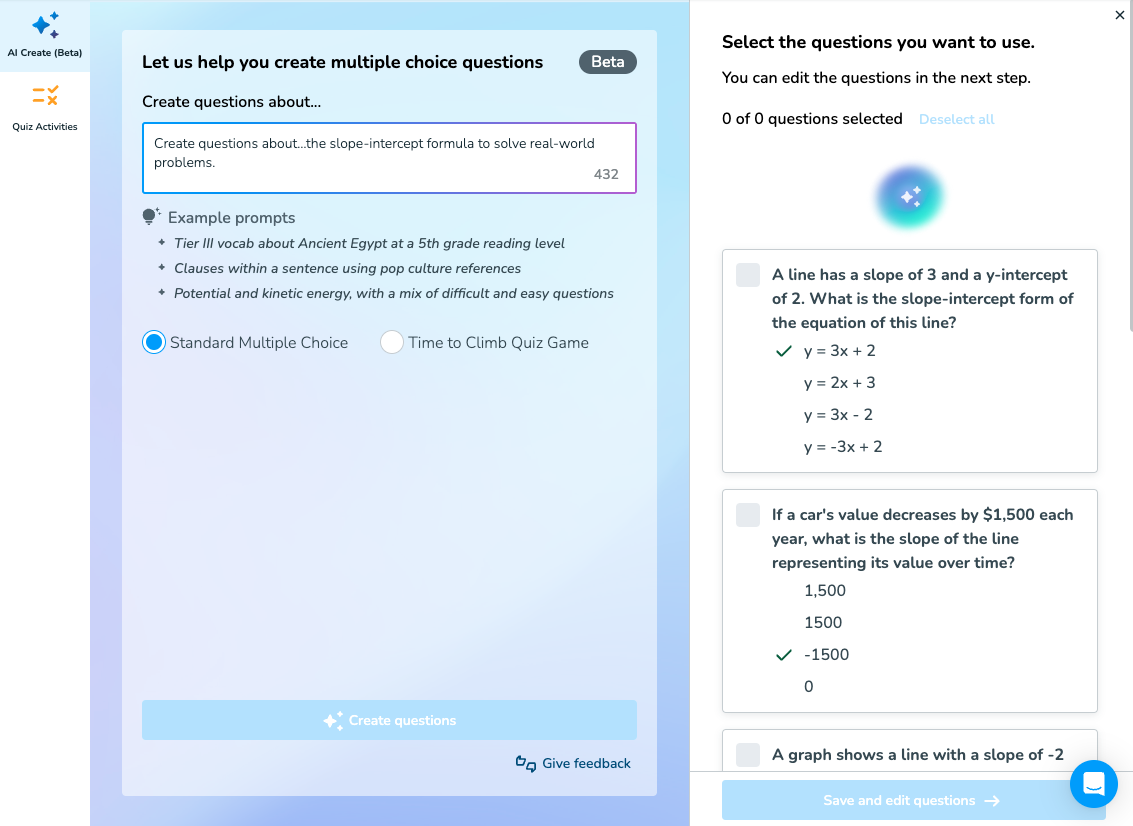
This question generator was created to give teachers more time to focus on what matters most—students. Count on AI Create to develop questions that spark curiosity, critical thinking, and meaningful discussions in your classroom.
How to write effective AI prompts for teachers using Nearpod’s AI Create tool
Nearpod’s AI Create tool was designed with teachers in mind and is easy to use. The best way to get started is to play around and see what happens.
Start by opening a new or existing Nearpod lesson and clicking AI Create on the right-hand side of the screen. Complete the sentence “Create questions about…” and click “Create questions.” AI Create will immediately craft 10 multiple-choice questions aligned with the request. Experiment and create!
For teachers who are especially pressed for time or interested in more specific AI prompts for educators, we’re excited to offer some tips to get the most from our powerful new tool. Use these tips to create your own AI for education prompt library.
1. Transform learning objectives into prompts
AI Create streamlines the lesson planning process. Start by simply identifying a learning objective—for example, “Students will be able to apply the slope-intercept formula to solve real-world problems.”
Then, craft a prompt, such as, “Create questions about…the slope-intercept formula to solve real-world problems.” The result? A variety of engaging questions that align with the learning objective. This innovative tool saves time, ensures curriculum alignment, and keeps students engaged.
Teachers working without a core curriculum or instructional designers who are focused on alignment might benefit from using state content standards in their prompts. It’s important to remember that standards requiring the identification of images, hands-on tools, or extended writing don’t work well in this context and will not generate valuable multiple-choice questions. That’s why it’s important to keep teachers at the centre of these decisions to determine if a standard is well-suited for multiple-choice text-only content.
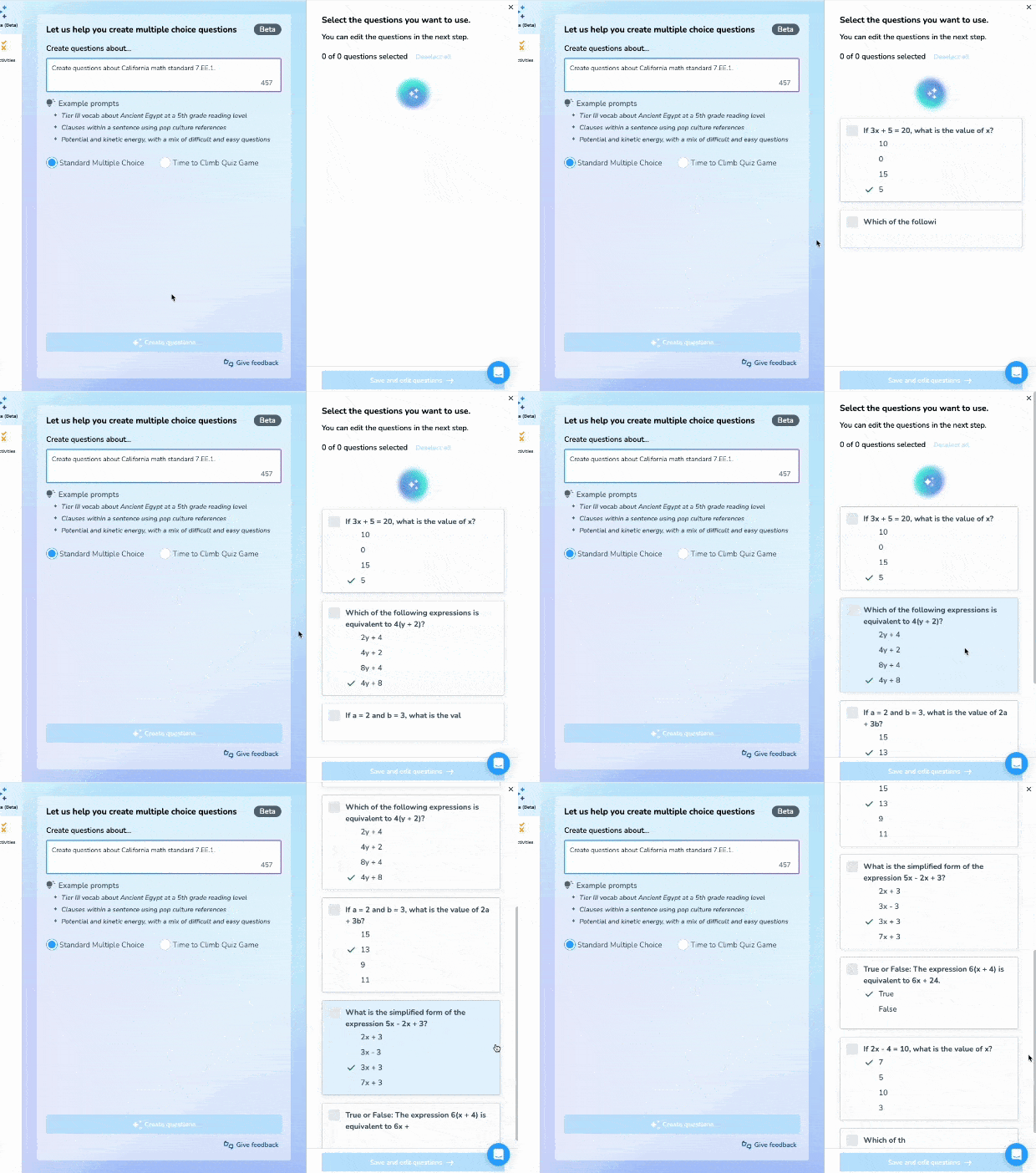
2. Use examples and personalise them
At Nearpod, we know the value of models for success. That’s why three example prompts appear under the AI Create prompt box, which can serve as excellent sentence frames for any teaching and learning AI prompts.
One example reads “Potential and kinetic energy, with a mix of difficult and easy questions.” Teachers can simply copy and paste that prompt and change the beginning—for example, “adding mixed numbers, with a mix of difficult and easy questions,” or “the Revolutionary War, with a mix of difficult and easy questions.”
The second example—“Clauses within a sentence using pop culture references”—can be a fun inspiration for themed questions. When creating engaging questions, substitute both the first and second parts of the sentence for creative and relevant questions that will jump-start deep thinking. The prompt “proportional reasoning with word problems using Taylor Swift references” is sure to engage students.
3. Customise to target specific student needs
Students are unique individuals with diverse learning styles, paces, and interests, and a one-size-fits-all approach fails to cater to these individual differences and generally leads to disengagement. However, differentiating instruction can be overwhelming. Though personalised instruction can help create a more inclusive and equitable classroom where all students can succeed, the Nearpod team knows it’s only possible when teachers have the necessary tools and resources.
With AI Create, teachers can generate multiple quizzes in a short period of time—they don’t need to write out multiple kinds of quizzes because Nearpod can do it for them. It’s as easy and simple as creating a new lesson and editing a prompt.
A simple way to differentiate a quiz for English Language Learners (ELLs) or special education students is to reduce the number of answer options. One group of students might receive a quiz with the default of four answer choices based on questions from the prompt “photosynthesis for 5th graders.” Another could receive a similar quiz with fewer answer options based on the prompt “photosynthesis for 5th graders that includes [number] answers per question.”
If students in the class lack background knowledge or have different grade-level goals, simply replace the grade level with the one specified in their IEP or one that is appropriate, given their past educational experiences. This is an excellent opportunity to communicate with specialists who work with these students, especially when co-planning time is limited. Special education teachers, ELL teachers, interventionists, and paraprofessionals can provide valuable insight to guide how these multiple-choice questions could be differentiated.
4. Differentiate for emerging readers
Most teachers encounter a range of reading levels in their classroom, and this is often the most challenging need to address. The higher the grade level, the wider the range.
When it comes to assessing content knowledge, it’s often valuable to make sure that literacy isn’t a barrier. Of course, we want to expose our students to rigorous, grade-level language, but separating that from content knowledge can be important when we want to understand students’ skills across other content areas. Often, working with ELLs or students with IEPs necessitates differentiation based on reading level. AI Create can help do the heavy lifting to address these needs.
5. Generate with the outcome in mind
Teachers can choose what kind of assessment they want to generate before submitting a prompt. Consider the purpose of the assessment before clicking “Create questions.” The default is a multiple-choice quiz.
Nearpod’s multiple-choice Quiz works well for summative assessments, basic checks for understanding, or exit tickets. AI Create will generate a classic 10-question multiple-choice quiz (with four answer options for each question) that’s ready to go.
This straightforward assessment can build students’ confidence as they prepare for standardised tests. You can also add in the exam style to the prompt, to mimic local exams, by extending the basic prompt like the following: “Create questions… [about topic] that are similar to [assessment name] assessments.” Of course, exams that require extended writing or models are not an appropriate fit.
To quickly focus students at the beginning of class or assess their understanding, create an entry ticket or exit slip by adding the desired number of questions to your prompt. Add “Create [number] questions” to the end of any prompt. This is also an excellent way to differentiate for students who need more time to process information and need a reduced cognitive load.
Nearpod’s Time to Climb activity is a great formative assessment for energising the class, creating some friendly competition, and reviewing material. These prompts for lesson plans will work just the same, but AI Create will build the questions into a fun, ready-to-use gamified quiz that features loveable avatars and a points earning system. Simply select the Time to Climb Quiz Game under the prompt box before creating the questions.
6. Revise the prompt based on results
AI Create can quickly create 10 questions about any content; however, you might not always get perfect results. Not to worry! Educators can select the questions they like, and then refine the prompt to generate 10 more questions that better align with what they’re looking for.
If the phrasing of the questions is unsatisfactory, refine the prompt so that certain language is excluded by adding “Questions should not [include this language]” to generate 10 more questions with better wording. Educators can also choose to exclude a type of question. For example, if AI Create returns with true and false questions, add “No true and false questions” to the prompt and click “Re-create questions.”
7. Keep the teacher at the centre
At Nearpod, we believe that teachers should always be at the centre of technology. That’s why AI Create requires teachers to review and choose each question. Once the teacher chooses the questions they want to incorporate in their assessment, they can edit, customise, and revise the selected questions. This process gives teachers the opportunity to add their unique insight, which AI can never replace.
8. Hack the AI
Hacking isn’t just about coding; it can be about using a tool for something slightly beyond its purpose. Though AI Create was made to build questions for a multiple-choice Quiz or Time to Climb Nearpod activity, there’s nothing stopping teachers from using the questions in other ways!
Try opening AI Create and Matching Pairs. Prompt AI Create to generate short questions for your activity, such as “Create questions about… photosynthesis for a matching pairs activity.” You can add “Make sure each question is short and succinct” to the end of the prompt if the questions are too long. Then copy and paste the resulting questions and answers into Matching Pairs.
The results might need some editing, but AI Create can definitely speed up the creation process. Rather than teachers having to think up the questions themselves, Nearpod’s AI Create supplies all the ideas, and the teachers can decide how to use them.
No need to be an engineer or computer science teacher to benefit from this hack!
Start using Nearpod’s AI Create today
The possibilities for using AI for students, teachers, parents, and administrators are endless. However, to harness the full potential of AI, it’s essential to understand the importance of crafting effective prompts for educators and leveraging AI product features. The best AI prompts for teachers can increase efficiency, enhance engagement, and improve accessibility, creating a learning environment that allows teachers to focus on creativity and personal connections.